> ## Documentation Index
> Fetch the complete documentation index at: https://docs.stardex.com/llms.txt
> Use this file to discover all available pages before exploring further.
# Blocking Campaign Progression on Task Completion
> Pause manual campaign steps until their tasks are complete and find recipients waiting on follow-up.
When a campaign step is a manual task, like a LinkedIn message, a connection request, a text, or a call, Stardex creates the task and the campaign moves on to the next step right away, whether or not you actually did it. Most of the time that's fine. But sometimes the next message only makes sense if the step before it really happened. You don't want a "great chatting on the phone" follow-up going out to someone you never actually called.
Turn on blocking for any manual step and the campaign genuinely waits. The next step isn't scheduled until you mark the task done, and then it's scheduled from that exact moment, not from whenever the step first came up.
***
## Turning it on
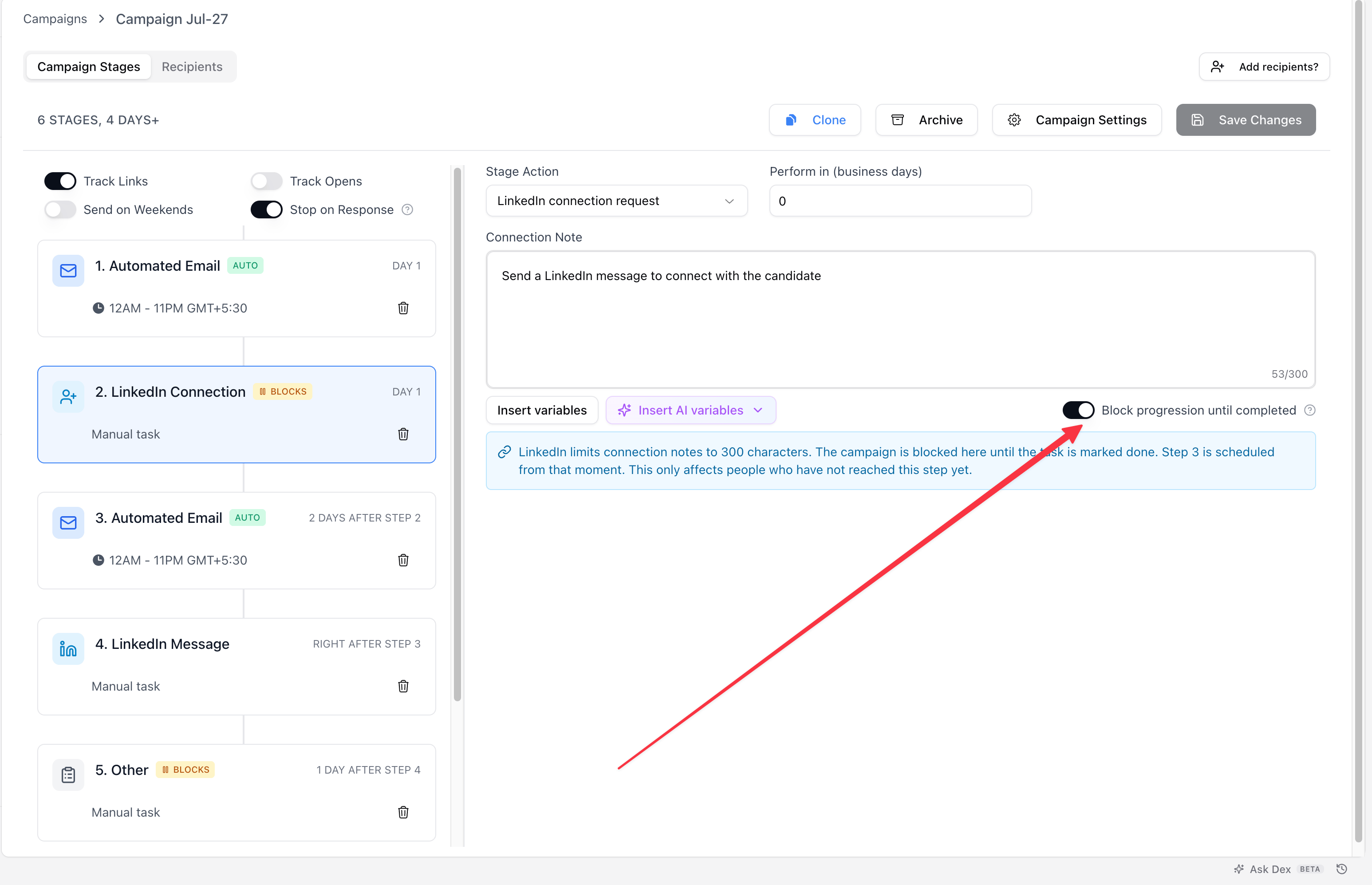
1. Open the campaign and go to the **Campaign Stages** tab.
2. Select a manual step: LinkedIn message, connection request, text, call, or Other. (Email steps send on their own, so this option doesn't apply to them.)
3. In the toolbar below the step's content, turn on **Block progression until completed**.
4. The info box below updates to confirm the campaign now pauses here, and names the step that comes next.
5. Click **Save Changes**.
The step picks up a **BLOCKS** label in the stage list, and every step after it switches to a relative day count, since there's no fixed date once a step is waiting on a person.
 > 💡Turning this on affects everyone still in the campaign who hasn't reached this step yet, not just people you enroll afterward. Anyone already past the step carries on as normal.
***
## Completing the task moves the campaign forward
Mark the task done from anywhere you'd normally do it: the Tasks page, the task's detail view, a person's profile, or the Chrome extension. The campaign then schedules its next step from that exact moment.
If the next step is an automated email and it's been more than **14 days** since the last one went out, Stardex checks with you first. Replying into a conversation that old usually reads oddly, so you get a prompt before anything is sent.
> 💡Turning this on affects everyone still in the campaign who hasn't reached this step yet, not just people you enroll afterward. Anyone already past the step carries on as normal.
***
## Completing the task moves the campaign forward
Mark the task done from anywhere you'd normally do it: the Tasks page, the task's detail view, a person's profile, or the Chrome extension. The campaign then schedules its next step from that exact moment.
If the next step is an automated email and it's been more than **14 days** since the last one went out, Stardex checks with you first. Replying into a conversation that old usually reads oddly, so you get a prompt before anything is sent.
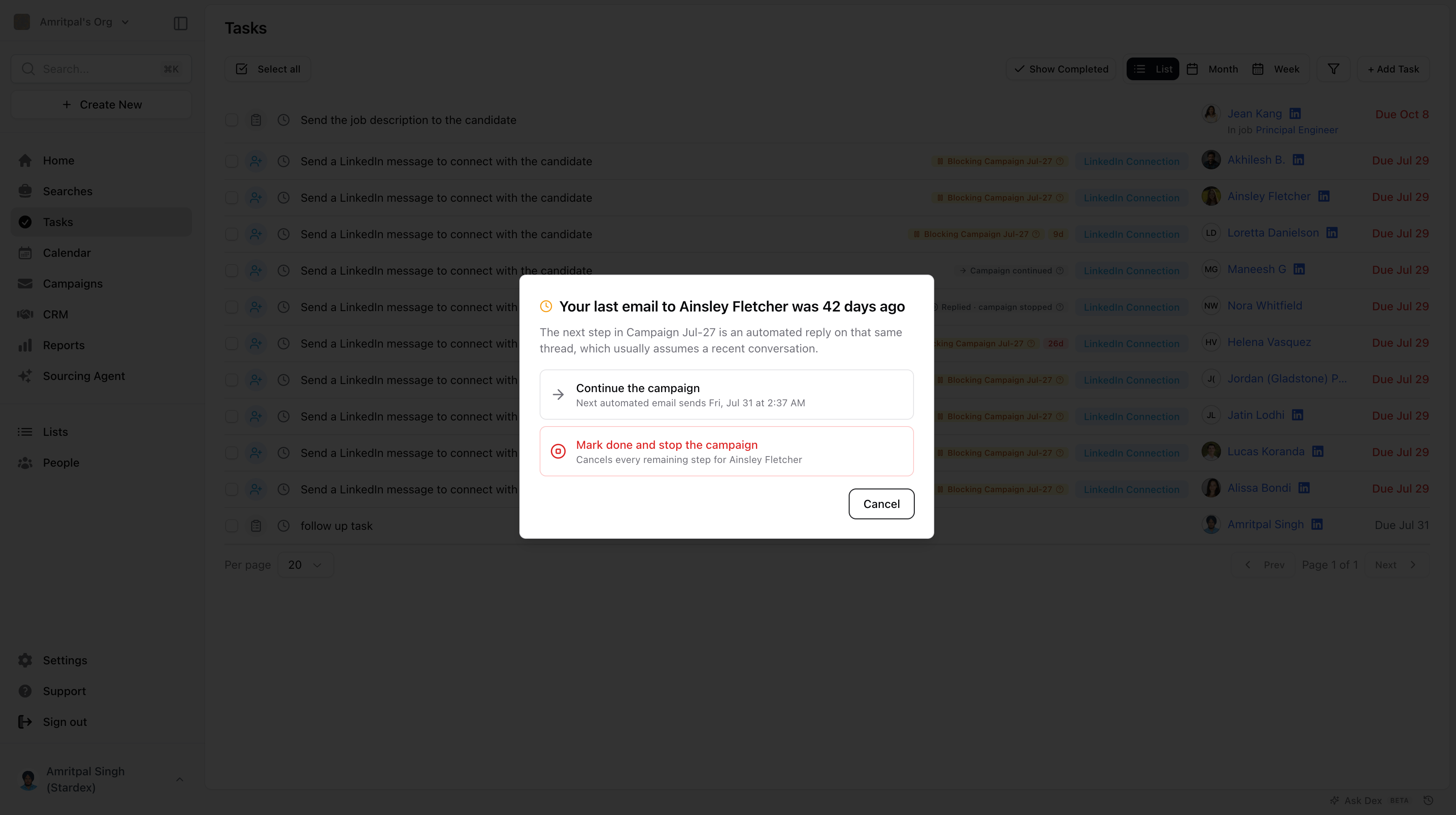 * **Continue the campaign** sends the next step as scheduled. The prompt shows you the exact date and time it will go out.
* **Mark done and stop the campaign** completes the task and cancels every remaining step for that person.
* **Cancel** leaves the task open and the campaign waiting, in case you want to check something first.
This prompt only appears when it's genuinely worth asking. A recent email, or a next step that isn't an email, won't trigger it.
***
## What the labels on a task mean
Tasks created by a blocking step carry a label that tells you where the campaign stands.
* **Continue the campaign** sends the next step as scheduled. The prompt shows you the exact date and time it will go out.
* **Mark done and stop the campaign** completes the task and cancels every remaining step for that person.
* **Cancel** leaves the task open and the campaign waiting, in case you want to check something first.
This prompt only appears when it's genuinely worth asking. A recent email, or a next step that isn't an email, won't trigger it.
***
## What the labels on a task mean
Tasks created by a blocking step carry a label that tells you where the campaign stands.
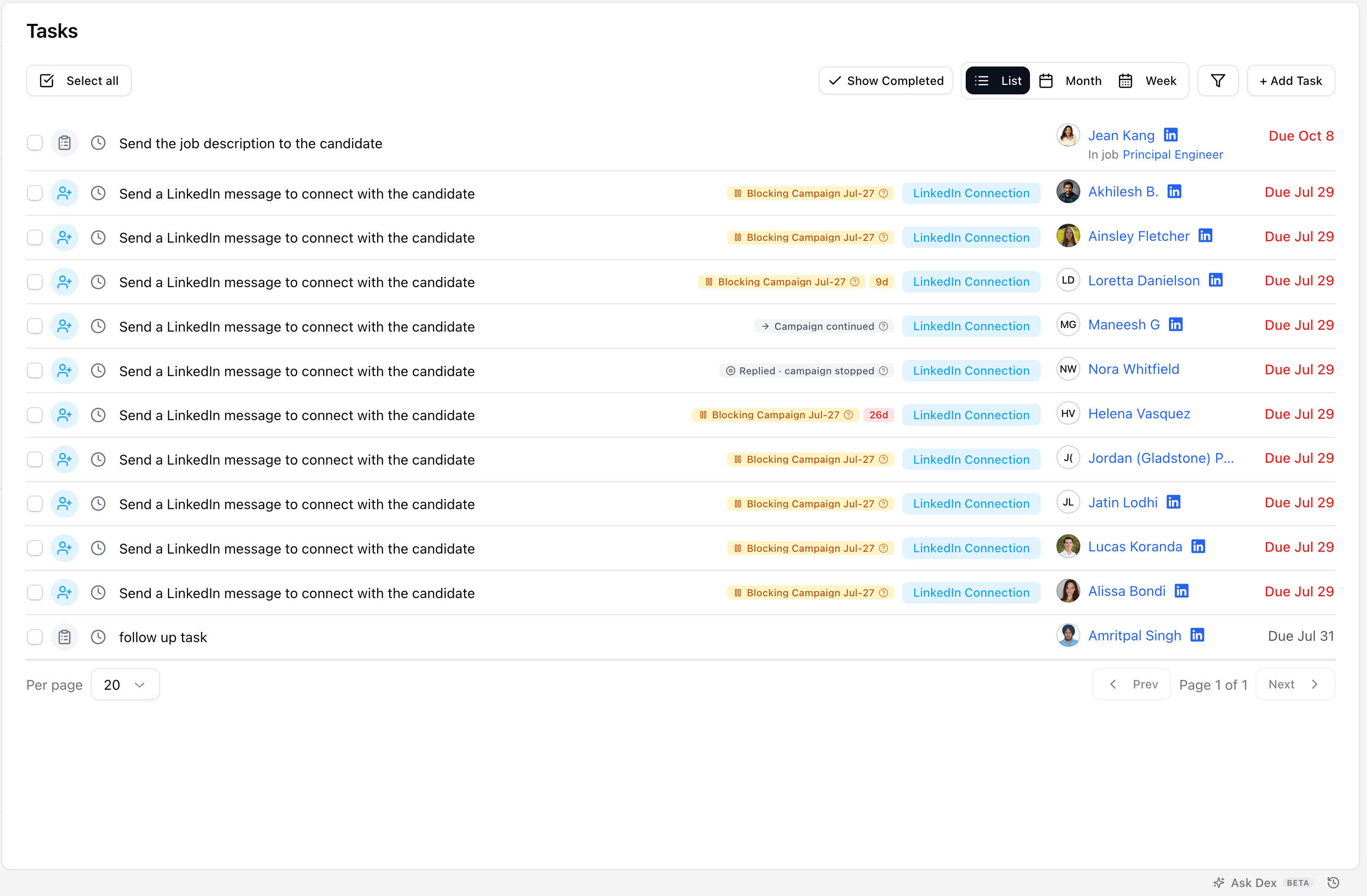 | Label | What it means |
| - | - |
| **Blocking \[Campaign Name]** | The campaign is waiting on this task. Mark it done and the campaign moves to its next step. |
| **Campaign continued** | The task is done and the campaign has already moved on. Reopening the task won't pause it again. |
| **Replied · campaign stopped** | The campaign ended for this person while the task was still open. The first word tells you why, for example because they replied or someone stopped their enrollment. Completing the task now won't restart anything. |
Once a task has been blocking for a few days it also shows a day count next to the label. That count turns red after 14 days, so the ones sitting too long are easy to spot.
***
## Finding who's waiting
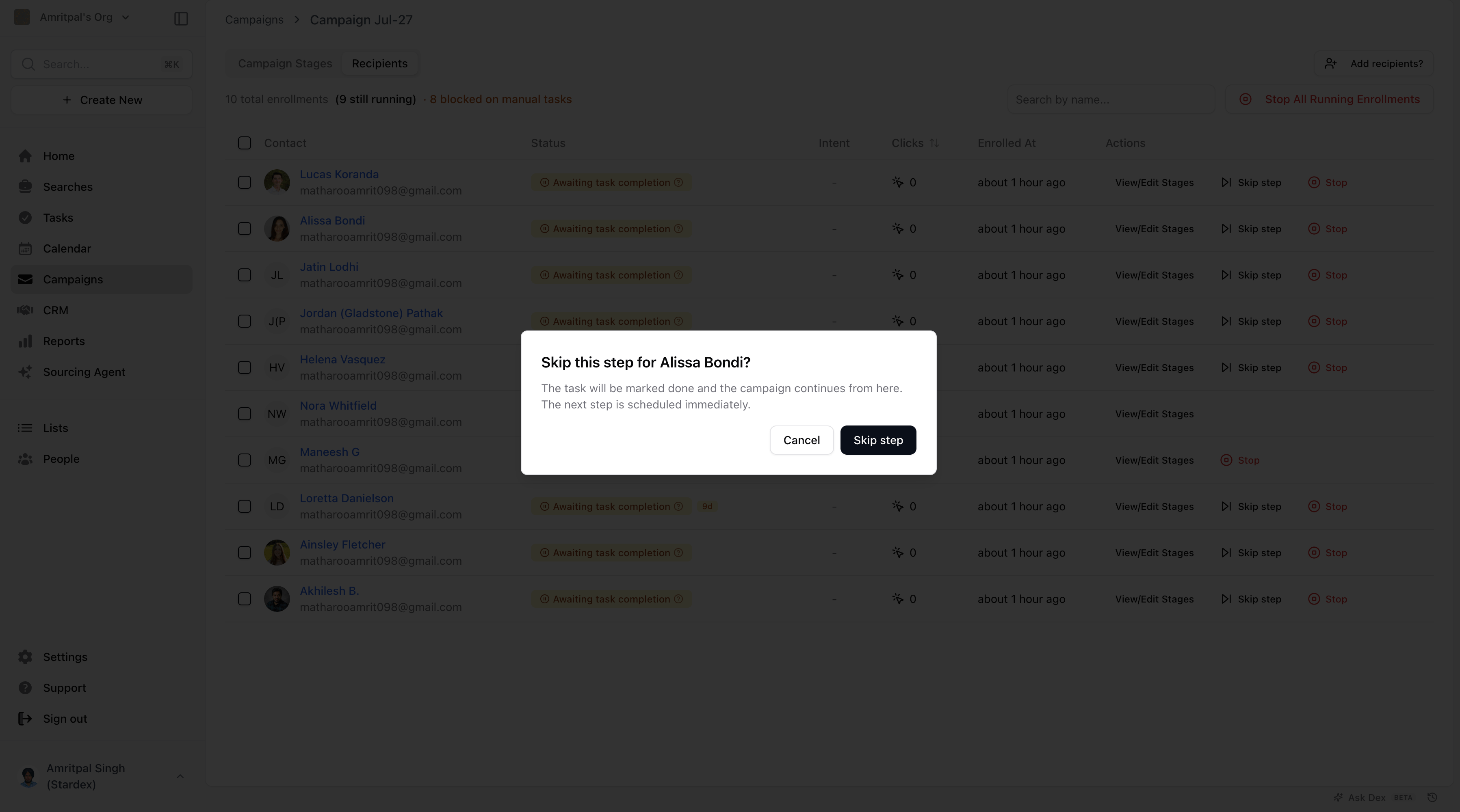
Open the **Recipients** tab on a campaign to see everyone currently paused. They show an **Awaiting task completion** status, and the header tells you how many are blocked on manual tasks.
| Label | What it means |
| - | - |
| **Blocking \[Campaign Name]** | The campaign is waiting on this task. Mark it done and the campaign moves to its next step. |
| **Campaign continued** | The task is done and the campaign has already moved on. Reopening the task won't pause it again. |
| **Replied · campaign stopped** | The campaign ended for this person while the task was still open. The first word tells you why, for example because they replied or someone stopped their enrollment. Completing the task now won't restart anything. |
Once a task has been blocking for a few days it also shows a day count next to the label. That count turns red after 14 days, so the ones sitting too long are easy to spot.
***
## Finding who's waiting
Open the **Recipients** tab on a campaign to see everyone currently paused. They show an **Awaiting task completion** status, and the header tells you how many are blocked on manual tasks.
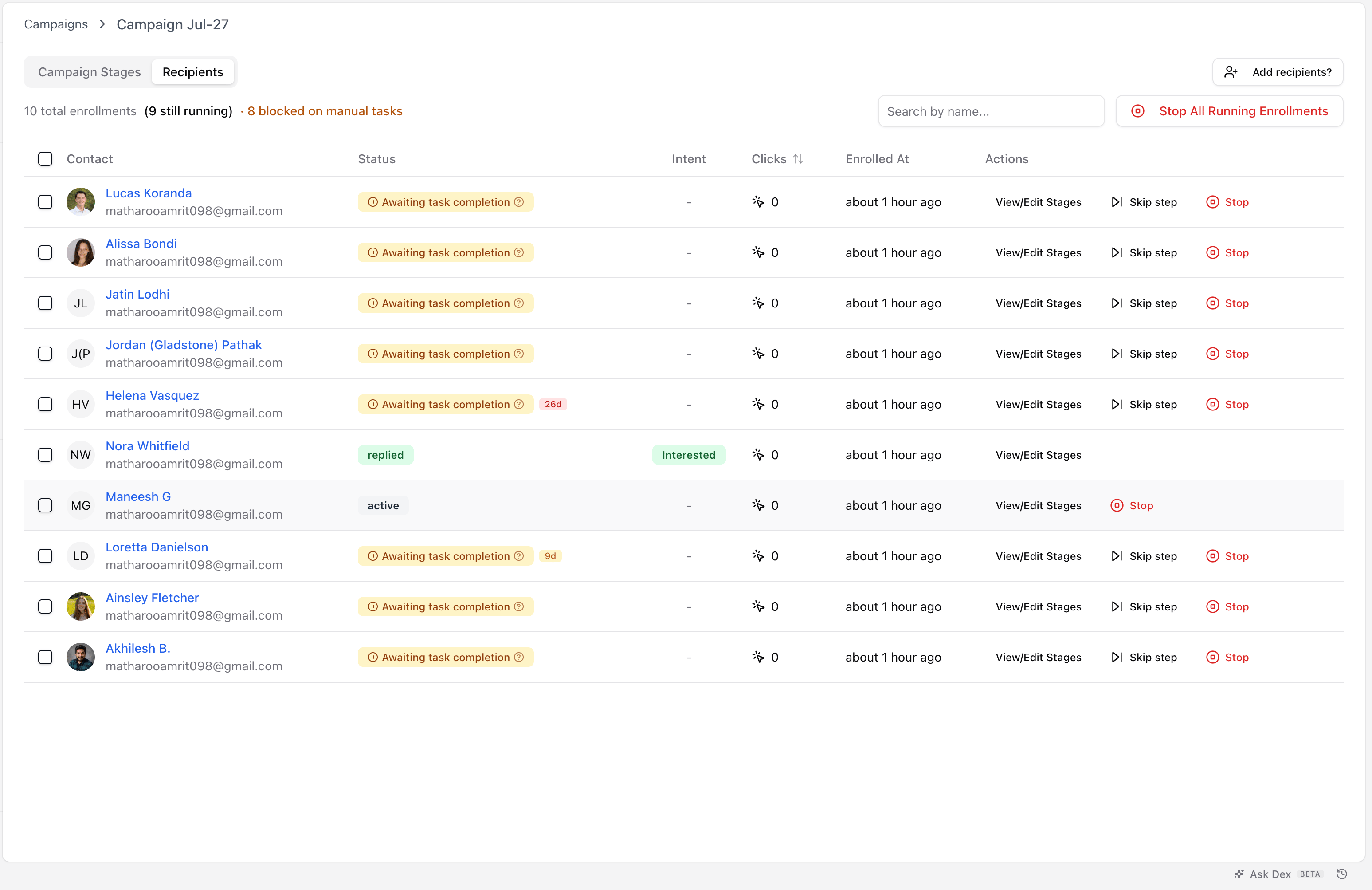 If someone did the outreach outside Stardex and you know they'll never come back to tick the task, click **Skip step** on their row. It marks the task done and moves them straight to the next step.
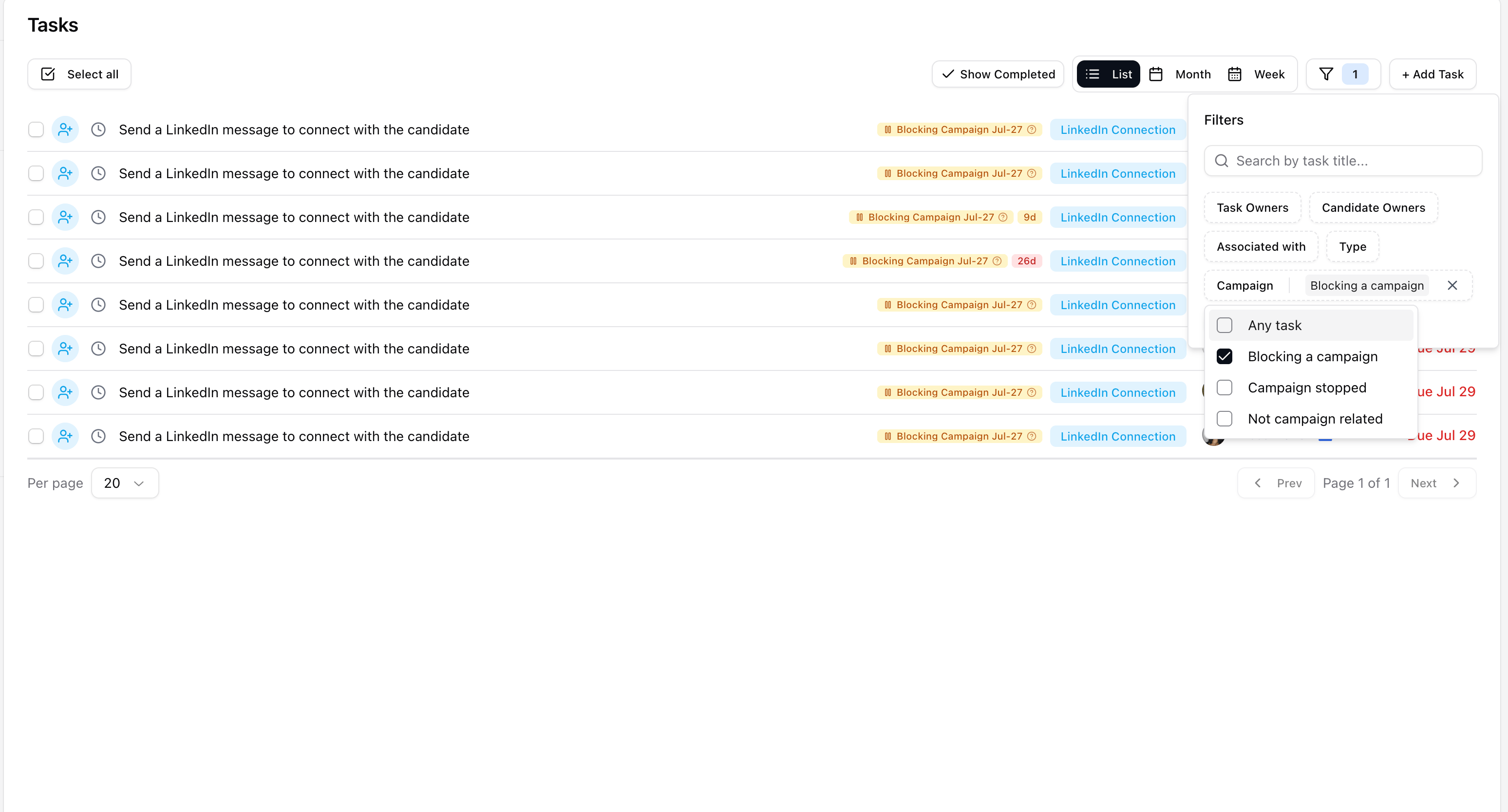
 To go the other way and see blocking tasks across all your campaigns, open the **Campaign** filter on the Tasks page. **Blocking a campaign** shows everything currently holding a campaign up, and **Campaign stopped** shows tasks whose campaign ended while they were still open.
 ***
## Deleting a task that's blocking a campaign
Deleting a task doesn't complete the step, it just removes the reminder, so Stardex asks what should happen to the campaign first.
***
## Deleting a task that's blocking a campaign
Deleting a task doesn't complete the step, it just removes the reminder, so Stardex asks what should happen to the campaign first.
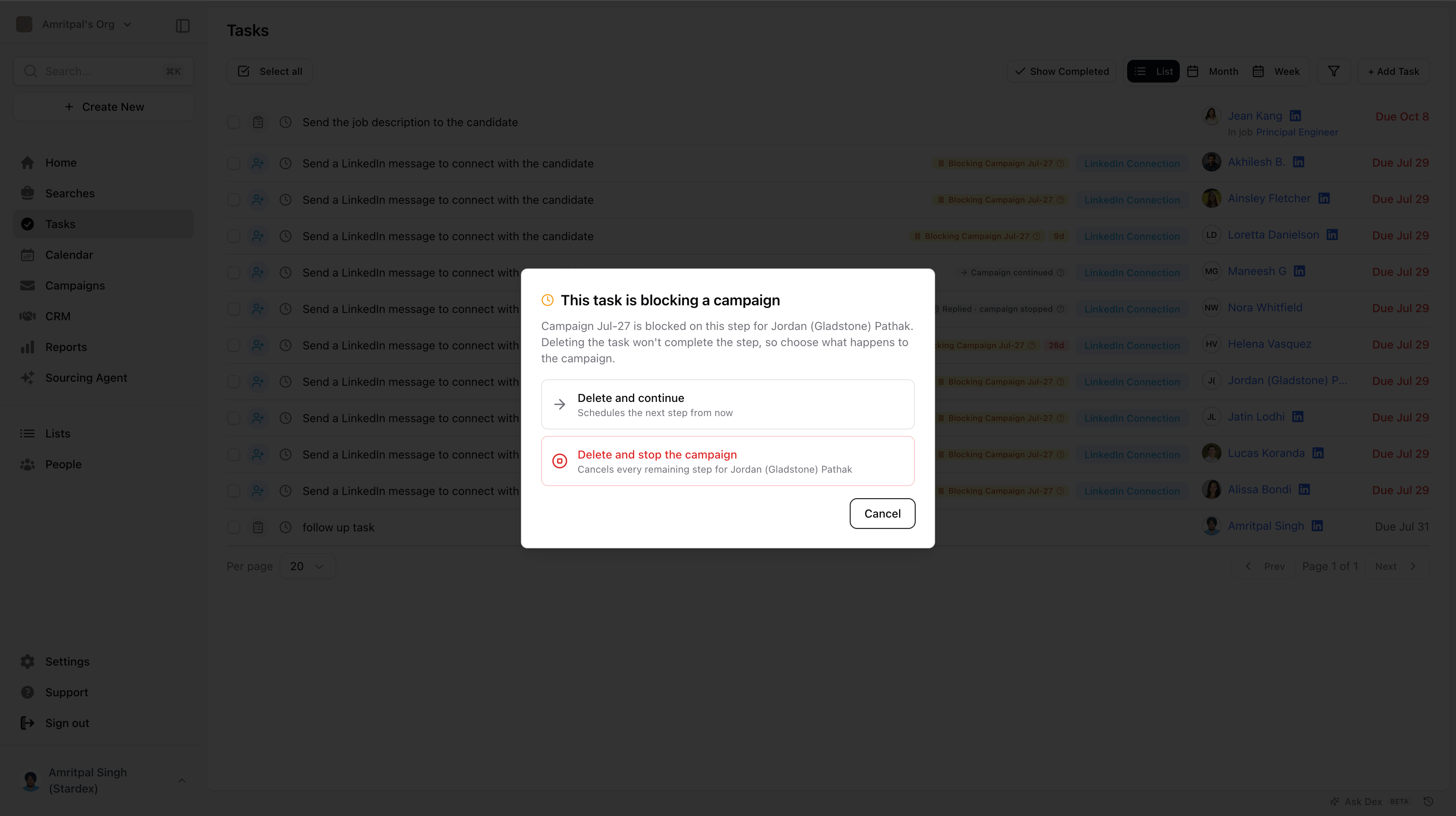 * **Delete and continue** moves the campaign to its next step, as if the task had been completed.
* **Delete and stop the campaign** cancels every remaining step for that person.
***
## Turning it off
If people are waiting at a step when you turn blocking off, Stardex tells you how many before you save.
* **Delete and continue** moves the campaign to its next step, as if the task had been completed.
* **Delete and stop the campaign** cancels every remaining step for that person.
***
## Turning it off
If people are waiting at a step when you turn blocking off, Stardex tells you how many before you save.
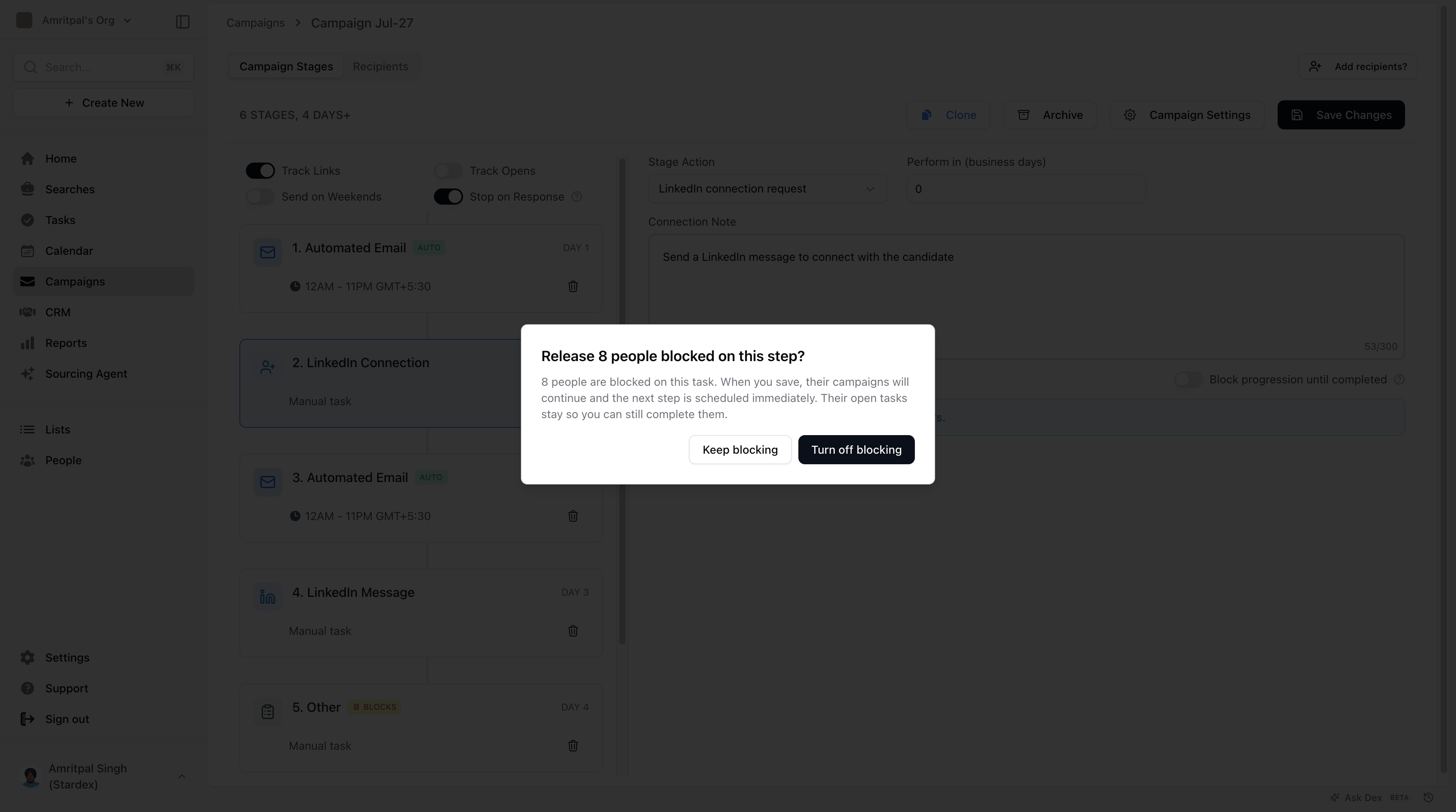 Choose **Turn off blocking** and save, and everyone waiting there is released. Their campaigns continue and the next step is scheduled immediately. Their tasks stay open in case you still want to complete them for your own records.
***
## Tips
* Turn this on for steps where the next message depends on what actually happened, like a follow-up that assumes you already spoke on the phone.
* If you did the outreach outside Stardex and won't be ticking the task off, use **Skip step** on the Recipients tab so one forgotten task doesn't stall a campaign.
***
## FAQ
**Q: Does blocking pause the campaign for everyone, or just the person the task is for?**
Just that person. Everyone else in the campaign keeps moving on their own schedule.
**Q: I turned this on while people were already in the campaign. What happens to them?**
Anyone who hasn't reached that step yet will pause there once they get to it. Anyone already past it carries on as normal.
**Q: Can I turn it on for more than one step?**
Yes. Each blocking step waits on its own task.
**Q: Does anything go out to the person while the campaign is waiting?**
No. Nothing is sent until the task is marked done.
**Q: Can I undo marking a task done?**
No. Once a blocking task is marked done, the campaign has moved on and stays moved on. Reopening the task won't pause it again, and the label changes to **Campaign continued** to make that clear.
**Q: Can I use this on an automated email step?**
No. Blocking is only for manual steps, since email steps send on their own.
***
## Related guides
* 👉 [Setting up your multi-step outreach campaign](/help-center/setting-up-your-multi-step-outreach-campaign), to build the campaign this setting lives inside
This documentation is built and hosted on [Mintlify](https://mintlify.com), a developer documentation platform.
Choose **Turn off blocking** and save, and everyone waiting there is released. Their campaigns continue and the next step is scheduled immediately. Their tasks stay open in case you still want to complete them for your own records.
***
## Tips
* Turn this on for steps where the next message depends on what actually happened, like a follow-up that assumes you already spoke on the phone.
* If you did the outreach outside Stardex and won't be ticking the task off, use **Skip step** on the Recipients tab so one forgotten task doesn't stall a campaign.
***
## FAQ
**Q: Does blocking pause the campaign for everyone, or just the person the task is for?**
Just that person. Everyone else in the campaign keeps moving on their own schedule.
**Q: I turned this on while people were already in the campaign. What happens to them?**
Anyone who hasn't reached that step yet will pause there once they get to it. Anyone already past it carries on as normal.
**Q: Can I turn it on for more than one step?**
Yes. Each blocking step waits on its own task.
**Q: Does anything go out to the person while the campaign is waiting?**
No. Nothing is sent until the task is marked done.
**Q: Can I undo marking a task done?**
No. Once a blocking task is marked done, the campaign has moved on and stays moved on. Reopening the task won't pause it again, and the label changes to **Campaign continued** to make that clear.
**Q: Can I use this on an automated email step?**
No. Blocking is only for manual steps, since email steps send on their own.
***
## Related guides
* 👉 [Setting up your multi-step outreach campaign](/help-center/setting-up-your-multi-step-outreach-campaign), to build the campaign this setting lives inside
This documentation is built and hosted on [Mintlify](https://mintlify.com), a developer documentation platform.